You have probably been told to "use AI on your data." It is good advice that rarely comes with instructions. Here's the ChatGPT version for a studio owner, not a data team. You can get a trustworthy answer this week: export a CSV from your CRM and upload it. The part nobody mentions — ChatGPT runs real code on that file instead of guessing. That is what makes it worth your time, and where the catch lives.
This is the operator's guide, not the gym-goer's. It covers members in aggregate — churn, attendance, revenue, lapsed accounts — not anyone's personal workout log. If you have read the companion piece on using Claude to analyze your gym's data, this is the ChatGPT parallel. It is re-checked, because the two tools behave differently in ways that matter.
Key takeaways
- ChatGPT can analyze a spreadsheet of member data today, no developer needed: export a CSV, upload it, and ask a question in plain English.
- It beats a plain chatbot for numbers because it does the actual math on your file — counting and charting the real data, not eyeballing it.
- It cannot reach your CRM on its own. ChatGPT only sees what you upload, and almost no gym CRM exposes a connector it can read.
- On a large CSV, ChatGPT can quietly read only some rows and report a confident but wrong total. Keep exports small, ask it to show its working, and spot-check the number.
- On a personal ChatGPT plan, your conversations train OpenAI's models by default. For real member data, use a business plan with a data processing agreement, or anonymize the export first.
- The control principle to hold onto: ChatGPT reads and proposes; you approve before it acts.
What ChatGPT actually is, and whether it's useful for a gym
ChatGPT is a general-purpose AI assistant. For a studio, the feature that earns its keep is Projects: a workspace — basically a folder. You upload your files once and write a few standing instructions ("you are helping me, the owner of a 200-member pilates studio, analyze member data"). ChatGPT keeps that context across every chat in the project, so you are not re-uploading your member list or re-explaining your gym every time. Projects are on the free and paid plans, per OpenAI's own documentation.
Is it useful for a gym? For the back-office questions you now answer by squinting at CRM reports, yes. For knowing your members without you handing it the data, no. Here is the scope a vendor pitch will never give you: a fast, patient analyst that works only on the data you give it. You do not need it for everything. The hype says you are behind if you are not automating your whole studio. You are not — one good answer to one real question is a fine place to start.
Can it work with your real member data?
Yes, through a loop that takes five minutes and zero engineering. Export a CSV — members, attendance, payments, whatever the question needs. Open a ChatGPT Project or new chat, upload the file, and ask in plain language.
Here is what makes ChatGPT worth choosing. When you upload a CSV or Excel file, it does not read the numbers the way it reads text. It works through the file properly — real counting and math on your numbers, then summaries, tables, and charts. Compare that to pasting figures into a plain chat and asking it to "add these up," where it guesses. (Under the hood it writes a little program to do the math, but you never see or touch that.) OpenAI documents this data-analysis behavior directly.
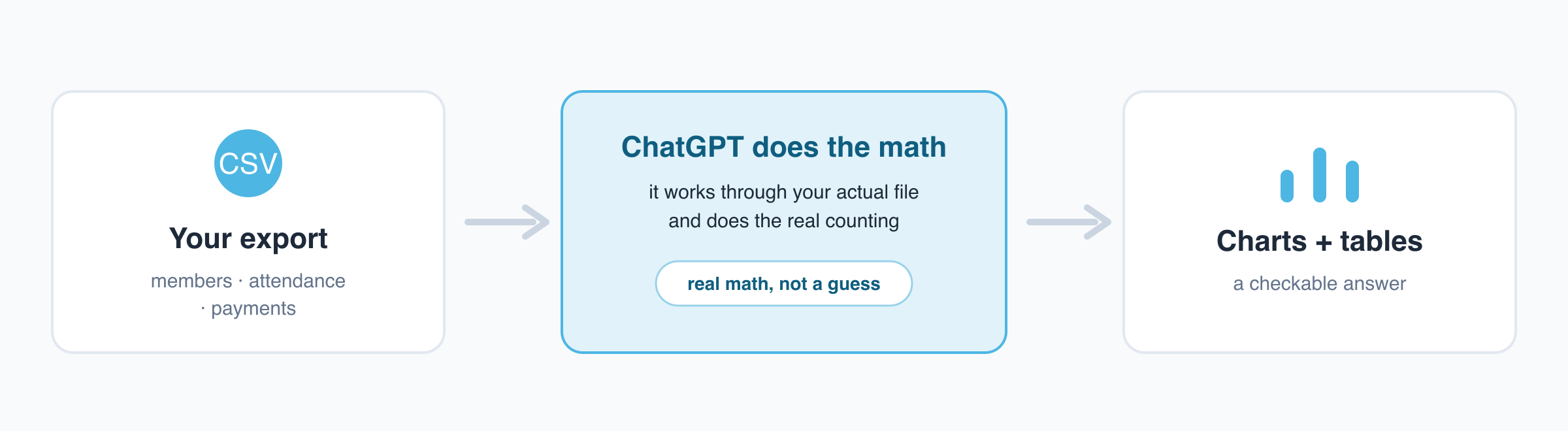
A note on names: OpenAI has called this Code Interpreter and Advanced Data Analysis at different times; the current help page just calls it data analysis. The name drifts; the behavior stays the same.
The skill here is not technical. It is asking a clear, scoped question — something any operator who can pull a CRM report already knows how to do.
What you can ask it about your gym
Once your CSV is uploaded, you ask the questions you care about, in plain words. A few that work well:
- "Who hasn't checked in in the last 30 days?"
- "What's my churn rate for the last three months?"
- "Show me revenue by membership tier this quarter."
- "Which classes consistently have low attendance? If I had to cancel one, which would it be?"
- "Show me unlimited-plan members with seven or fewer check-ins in April."
- "Draft a friendly win-back message for the lapsed members above."
That last one is the move most operators miss: the same tool that finds the at-risk members can draft the outreach to them. For more prompt patterns built for studio owners, the companion piece on ChatGPT prompts for gym owners goes deeper. Acting on that list of lapsed members is the next step — its own subject in using AI to reduce gym member churn.
These are illustrative, not guaranteed. The answer's quality depends on the export and on you checking the result, covered next.
Can you trust the numbers it gives you?
Yes, if you work with it the right way — not blindly. This is the loudest objection operators have, and a fair one.
The ChatGPT-specific risk: on a large CSV, it can read only some rows and quietly extrapolate the rest. It then reports a total that sounds authoritative and is wrong, and will not flag that it did so. Running code makes it more reliable than a plain chatbot, but it can still sample or truncate a big file and not tell you.
The fix is a habit, not a setting:
- Keep exports small and clean. Pull only the columns one question needs. A tight file is less likely to be truncated and easier to verify.
- Ask it to show its working. "Show me the code you ran" or "show me your steps." You do not need to understand code to check whether it counted the right column.
- Spot-check the headline number against your CRM before you act. If it says 42 members lapsed, confirm 42 looks right in your dashboard.
This is the discipline a good operator applies to a junior staffer's report. Useful, but you glance at the math before it goes to the whole studio. Treat ChatGPT's output as a strong draft, not a final answer.
Is it safe to put member data into ChatGPT?
It is a risk to manage, not a law you are breaking. For an EU operator this is a real consideration, and it deserves a precise answer — not a scary one or a reassuring one. The position depends on your plan:
- Personal ChatGPT (Free, Plus, Pro on a personal account): by default, your conversations train OpenAI's models. You can opt out in Settings, then Data Controls (the toggle is currently labeled along the lines of "improve the model for everyone"). For one-off analyses, use Temporary Chat. OpenAI documents this in its Data Controls FAQ. The default trains on inputs and the label can change, so pasting raw member names, emails, and phone numbers into a personal-tier chat is a real GDPR risk.
- ChatGPT Team, Enterprise, and the API: OpenAI states it does not train on your business data by default. It also offers a formal data agreement (a DPA) for GDPR, per its enterprise privacy page. This is the tier for real member data.
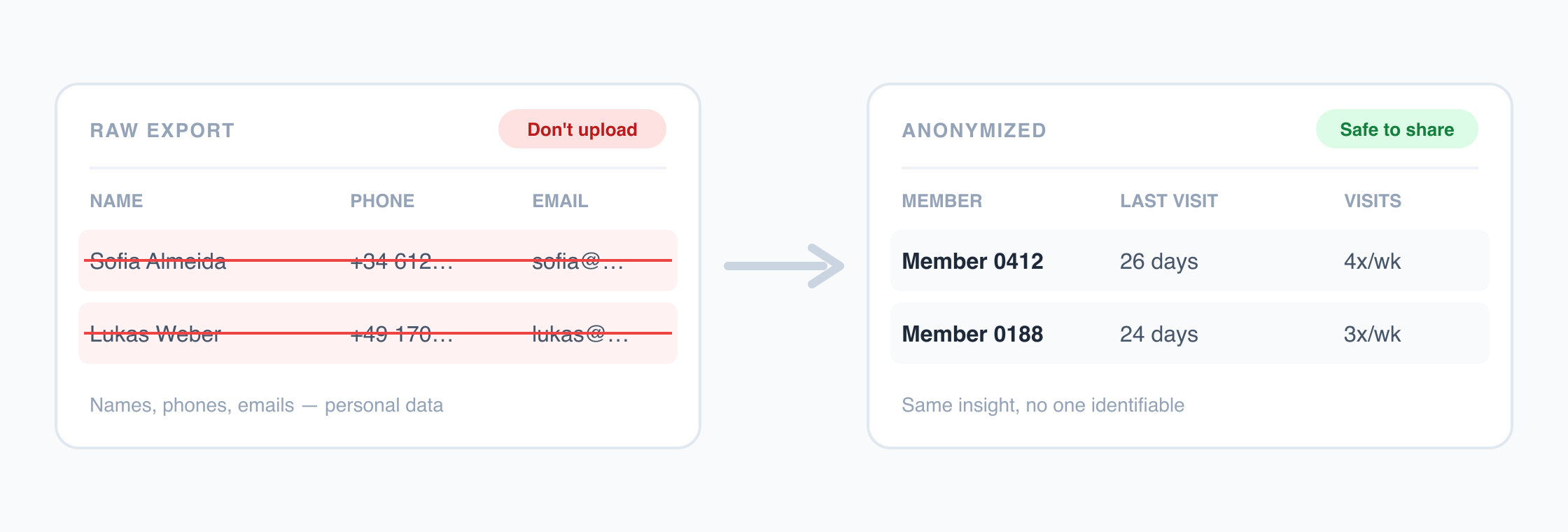
There is a safe path either way, whatever your plan: anonymize the export before you upload it. Strip out names, emails, and phone numbers, replace each member with a neutral ID, and share only the columns the question needs.
You are looking for patterns — who lapsed, which tier churns, which class empties out — and patterns do not require identities. Sharing only what's needed removes most of the worry.
What we will not tell you is that "your data never leaves" or "OpenAI never trains on it." Neither is true without conditions. It depends on your tier and your settings. Check your own Data Controls screen and pick the plan that matches what you are uploading. For the broader regulatory backdrop, the companion piece on the EU AI Act for fitness businesses covers the landscape — context, not legal advice.
How much setup this really takes
Less than you fear. The export-and-upload loop needs no developer, no BI tool, no license beyond a ChatGPT account, and no code. You work in your browser. The effort is framing a good question, not plumbing anything together.
The heavier paths exist, but you do not need them to start. Building a custom GPT (a saved ChatGPT with your instructions and knowledge files baked in) is a paid-plan step. Wiring up a live connector is a separate project. Neither is required for your first useful answer.
How ChatGPT connects to live data, and why it matters for gyms
Manual upload is the floor. ChatGPT does have ways to reach live data beyond a one-off file. Understanding them tells you what is real and what is over the horizon for gyms. Three options, escalating:
- Connectors (sometimes called "apps"): these link ChatGPT to mainstream services like Google Drive, Gmail, SharePoint, and HubSpot. Availability varies by plan and by region. Several have rolled out excluding the EEA, UK, and Switzerland, so do not assume one you read about is available to you. The closest thing to a CRM is HubSpot, on paid tiers — no fitness CRM.
- GPT Actions: these let a custom GPT connect to another tool's system directly — a developer build step, not a toggle you flip.
- MCP (Model Context Protocol): an open standard, introduced by Anthropic in November 2024, adopted by OpenAI in 2025. ChatGPT can now use MCP connectors on its business tiers and in Developer Mode. ChatGPT Agent (2025) can run multi-step tasks against connected or browser-reachable sources.
Here is the catch for a studio. Each only helps if the tool on the other end exposes a connector, an Action, or an MCP server. For email and cloud drives, plenty do. For your member system, almost none do.
| Way to get gym data into ChatGPT | What it is | Setup needed | Works with a gym CRM today? |
|---|---|---|---|
| CSV upload | Export a file, upload it, ask a question | None, just a browser | Yes, this is the path that works now |
| Connectors / "apps" | Link ChatGPT to apps like Drive, Gmail, HubSpot | Toggle, varies by plan and region | No fitness CRM on the list |
| GPT Actions | A custom GPT calls an external API | Developer build step | Only if someone builds and hosts it |
| MCP server | Open standard ChatGPT can connect to | Business tier plus an exposed server | Almost no gym CRM exposes one |
So the live-connector future is here for some software, and not yet for gym CRMs. You do not need to learn MCP to start. But it is why some tools will plug straight into an assistant once they expose a server, while others still leave you exporting CSVs.
Why your gym software can't just do this, yet
It is tempting to read all this as "ChatGPT is limited." It is not. The limit is that your member data sits behind a CRM that has not opened a door for ChatGPT. As of mid-2026, no major gym CRM (Mindbody, Virtuagym, Glofox, ABC, PushPress, bsport) ships an official ChatGPT app or connector. That is the ceiling of the do-it-yourself approach. The data and the analyst are both there; the wire between them is not, so you carry it across by hand with an export.
One aside for the technically inclined: a community-built, individual-developer integration for one CRM exists publicly. A technical operator could self-host it and wire it into ChatGPT's Developer Mode. That is a build-it-yourself, unsupported route, not something your vendor offers. For everyone else, the manual export loop is the path.
Worth separating out: OpenAI has been connecting consumer health apps (Apple Health, MyFitnessPal, Peloton) through ChatGPT Health. That is individual, member-side workout data, not your gym's back-office or CRM data. It does not close the operator gap, so do not let the name mislead you.
The category that skips the export
A different kind of tool sidesteps the export loop entirely: platforms that already unify a studio's data and have AI built in. You ask your questions in plain English inside the product — no CSV, no waiting for a connector. Asking your data in plain language is its own discipline, covered in the piece on conversational analytics for fitness studios.
Nutripy is one example. It unifies a studio's gym data, has AI built in, and exposes its own MCP connector. That lets an assistant reach saved dashboard widgets (your reports) and staff KPIs. The point is not the product; it is the shape of the solution. When the connection already exists, the export-and-verify chore disappears: the tool reads the live system, not a pasted-in snapshot. For the wider view of where this fits, the AI studio operations guide is the hub.
How to try it this week
You can do this in one sitting:
- Export one CSV from your CRM. Start narrow — attendance or the member list — and pull only the columns your first question needs. If the file has member personal data, anonymize it first or use a business plan.
- Open a ChatGPT Project, upload the file, and ask one real question. "Who hasn't visited in 30 days?" is a good first one — the answer is immediately actionable.
- Ask it to show its working and spot-check the number. Confirm the headline figure against your CRM before you act.
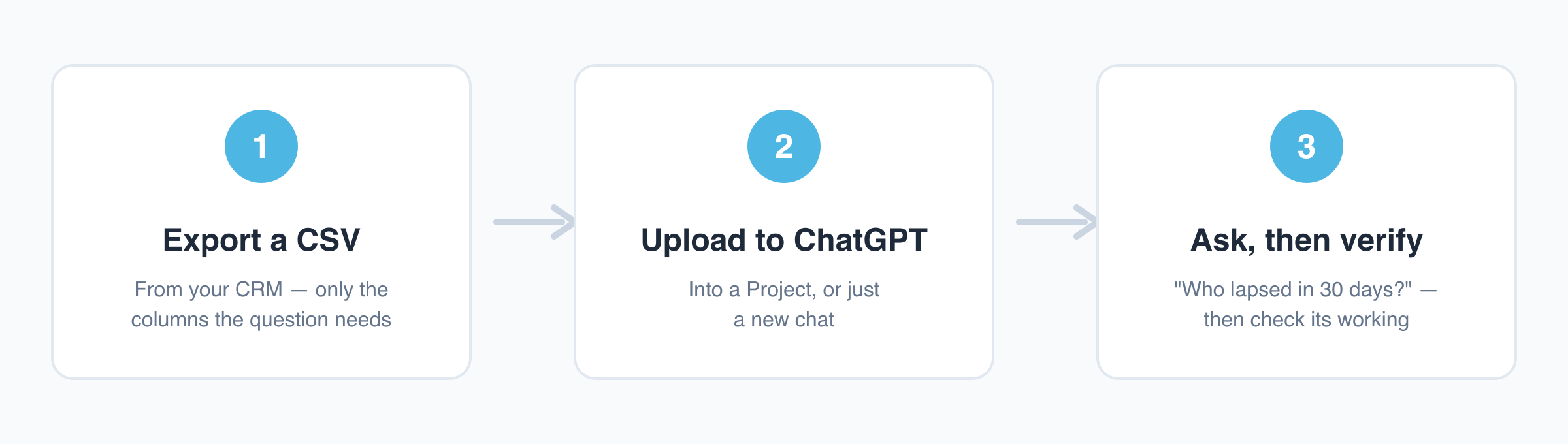
That is the whole loop. If it gives you something useful, do it again next week with a different question. And if the export-and-verify chore starts to nag, that is exactly what an already-connected, AI-built-in platform removes.
FAQ
Can ChatGPT connect directly to my gym CRM like Mindbody or bsport?
Not by default. ChatGPT only sees the files you upload, and as of mid-2026 no major gym CRM ships an official ChatGPT app or connector. The path that works today is to export a CSV and upload it. A live connection needs your CRM to expose a connector, Action, or MCP server, and almost none do.
Is it safe or legal to upload member data into ChatGPT?
It is a risk to manage, not a law you are breaking. On a personal ChatGPT plan, conversations train OpenAI's models by default, which makes uploading raw member personal data a real GDPR risk for an EU operator. Two safe paths. One is a business plan (Team, Enterprise, or API) that does not train on your data by default and offers a data processing agreement. The other is anonymizing the export first — strip names and contact details, use a neutral ID per member. This is general risk guidance, not legal advice.
Can I trust the numbers ChatGPT gives me?
Yes, if you work with it carefully. Because ChatGPT runs actual code on your file, it is more reliable than a plain chatbot for spreadsheet math. But on a large CSV it can quietly read only some rows and report a confident but wrong total. Keep exports small and clean, ask it to show the code it ran, and spot-check the headline number against your CRM before acting.
Do I need a developer to use ChatGPT on my gym's data?
No. The export-a-CSV, upload it, ask-a-question loop needs no code and no developer — just a browser and a ChatGPT account. The harder paths (a custom GPT, a connector, an MCP integration) involve build steps. You do not need any of them for your first useful answer.
What is MCP, and do I need to understand it?
MCP (Model Context Protocol) is an open standard for connecting AI assistants to external tools and data. Anthropic introduced it in November 2024, and OpenAI adopted it in 2025. You do not need to understand it to start analyzing a CSV. It matters because some tools plug directly into an assistant once they expose an MCP server. Your gym CRM has not, so it still leaves you exporting by hand.